I’m a tech expert and new mum. Here’s what I learned testing 17 baby monitors
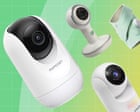
I’m a tech expert and new mum. At their most basic, baby monitors typically consist of a baby unit, which you position near the baby, and a parent unit, which lets you hear and/or see them.
Our tech expert and new mum tested 17 monitors for picture quality, battery life and reliability – here’s what she recommends
Moving my baby into her own room to sleep felt liberating and stressful. She was ready for her own space – but was I ready to let her out of my sight? Well, the first thing I did was buy a video baby monitor, so clearly I wasn’t. But it meant she could sleep peacefully in her new room and I could sneak a reassuring peek from afar whenever I felt the need.
There’s a huge range of baby monitors, from simple audio-only options to sophisticated video models. Some even include wearables or other devices to track a baby’s breathing or heart rate, while others offer AI features to analyse sleep patterns. At their most basic, baby monitors typically consist of a baby unit, which you position near the baby, and a parent unit, which lets you hear and/or see them. With video models, the baby unit is essentially a camera, while the parent unit is a screen. Many are also wifi-enabled, meaning you can connect the monitor to your smartphone and view the live feed through an app instead of using a dedicated parent unit (read on for security advice).
With so many types of baby monitors to choose from, it can be tricky to distinguish the useful features from those that are simply nice to have. To cut through the noise, I tested 17 different models to help you find the best baby monitor for your needs.
I’ve been a technology journalist for 15 years, getting hands on with all kinds of consumer gadgets in that time. When I was expecting my first child, I flexed my product-testing muscles by reviewing pregnancy pillows and, after my baby was born, baby carriers. Testing baby monitors brings those two worlds together, combining my tech expertise with my experience as a new mum. To make sure my testing was informed by experts, I spoke with Jenny Ward, chief executive of the Lullaby Trust, for advice on safe sleep, and Alexis Hancock, director of engineering at the Electronic Frontier Foundation, about privacy and security.
I temporarily turned my baby’s room into a panopticon of infant surveillance to put 17 baby monitors through their paces. Models were selected to cover a range of prices and features, with most of them including video.
I started by using a stopwatch app to time how long it took to get each monitor up and running. To test image quality, I set up each camera with a view into my child’s cot, using teddy bears as a stand-in for a live baby. I compared video streams for image clarity, consistency and colour, and I used blackout curtains to test night vision. I also placed a wireless speaker among the teddy bears and played a podcast to test sound quality.
While wifi-connected baby monitors should be viewable from anywhere you can connect to the internet, non-wifi models have a limited range. To test this, I took each non-wifi parent unit on a slow walk down my street and noted how far I got before connection was lost. To test the battery life of each parent unit – as well as one baby unit that could be used unplugged – I charged each device fully overnight before testing. I then set the screen to remain on continuously, rather than switching to sleep mode, and checked the parent units at hourly intervals, noting how long each took to run out of power.
Finally, I tested each baby monitor in real-world conditions, using it to keep an eye on my baby during naps and overnight sleeps.
First, decide on the type of monitor you want. The most basic is an audio-only monitor. More common today are video monitors, which include a camera so you can see as well as hear your baby – useful if you want to know when they’re actually asleep, or check on any noises without entering their room.
One key distinction between baby monitors is whether or not they use wifi. Non-wifi baby monitors come with a parent unit – which includes a screen for video models – while wifi baby monitors can stream images to your phone or tablet via an app. They offer a much greater range, so you can monitor your baby from anywhere with an internet connection. They can act as a kind of “nanny cam” if you want to check in on your baby while you’re away. Some also give other caregivers (grandparents, for example) access to the feed, too. However, wifi models carry greater security and privacy risks, so some parents prefer non-wifi options.
Wifi baby monitors in particular offer various “smart” features, with newer brands offering AI tools to track your baby’s sleep patterns or wearable devices to monitor breathing or other health stats.
Anything that is connected to the internet presents a risk, however small, of being hacked, and there have been reports of criminals gaining access to baby monitor feeds.
Most hacking incidents concerning baby monitors occur due to account compromise, says Alexis Hancock, director of engineering at the Electronic Frontier Foundation. “However secure your account is that is tied to the baby monitor, that’s how secure the baby monitor is,” she says.
If you decide to get a wifi baby monitor, Hancock recommends going with a trusted brand and using a strong, unique password – it’s best to use a password manager, so you don’t need to remember it. Keep the account limited to your baby monitor; if you use it to connect to other devices, such as in a smart home setup, you’re broadening the potential for a security weakness to occur. A good baby monitor should have a second authentication step, such as sending a one-off code, before logging you in.
“In this day and age, companies should have some sort of two-factor authentication, especially with technology involving our very small children,” Hancock says.
There is no evidence that any type of baby monitor reduces the risk of Sids, says Jenny Ward, chief executive of the Lullaby Trust, which supports families and promotes safer sleep. Its guidance is that babies should sleep in their parents’ room until they are at least six months old, so you may not need a monitor at all during this time. That said, breathing monitors can provide reassurance in particular situations: the Lullaby Trust offers certain monitors through a scheme for parents who have previously experienced the sudden death of a baby.
These monitors, such as the Snuza HeroMD, only track movement and sound an alarm if none is detected for a period of time. But be warned, Ward says: at some point, the alarm will go off, either because of a false alarm or because you’ve forgotten to turn it off after moving your baby out of the cot. I discovered this at 3am while testing the Angelcare monitor, which uses a pad under the mattress to detect movement. Thankfully, my baby was fine.
The Lullaby Trust doesn’t offer monitors that track information such as pulse rate or oxygen saturation. “Sometimes, having more data to look at can be quite anxiety-inducing,” Ward says. If you choose to use one, make sure you understand the instructions and what is normal for your baby. Of course, if you are at all worried about your child’s health, seek medical advice – regardless of what the monitor says.
Our test included baby monitors from about £30 (for an audio-only monitor) to nearly £400 for a smart monitor with a wearable. The cheapest video monitors I tested started at about £50, but I found the trade-off in quality was too great at this price point. The cheapest video model I have recommended here is less than £100.
Some wifi-only models are cheaper than their non-wifi counterparts, often because they don’t include a parent device. However, many sit at the pricier end of the market, thanks to additional smart features. Check if a stand or wall mount is included, too, or if you need to buy this separately.
For more: From reusable nappies to wipes: the best eco-friendly baby products Parents on the baby gear they wouldn’t go without The best gifts for kids by age
Victoria Turk is a technology and culture journalist. She spends her days juggling writing and parenting – something that works particularly well when she’s testing baby products. As a new mum, she’s particularly interested in any consumer device that can help with a good night’s sleep
- baby
- monitor
- unit
- tech
- expert
- mum
- video
- parent